launcher
The launcher is the central entry point for SituationReport. It displays all available and planned modules as a card grid and allows launching them with a single click.
Start:
Or via the start script in the portable package:
- Windows: SituationReport.bat
- macOS: SituationReport.command
- Linux: SituationReport.sh
Manuals
| Language | Download |
|---|---|
| Deutsch (DE) | Benutzerhandbuch |
| English (EN) | User Manual |
| Română (RO) | Manual de Utilizator |
| Português (PT) | Manual do Utilizador |
| Français (FR) | Manuel d'utilisation |
Interface
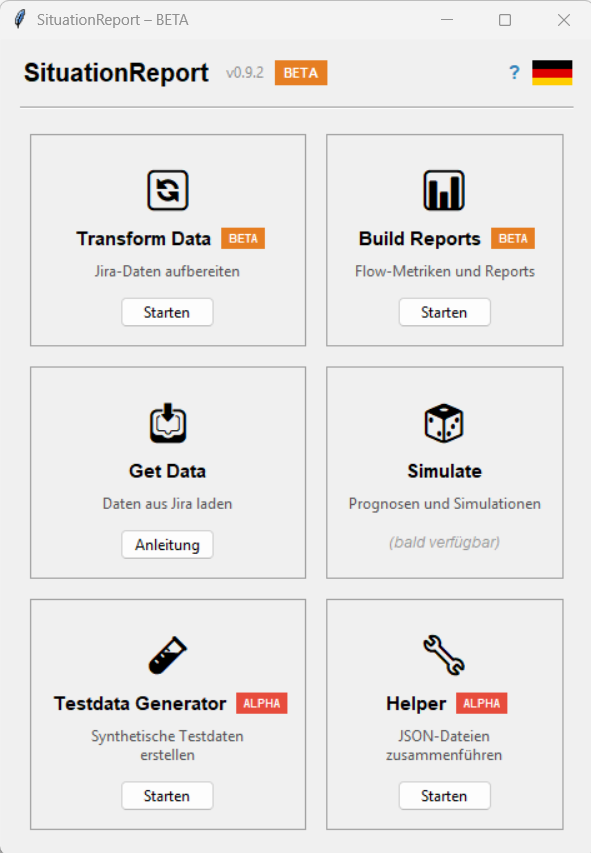
┌──────────────────────────────────────────┐
│  SituationReport  v0.9.8  BETA     ?  🌐 │
├──────────────────────────────────────────┤
│  ┌──────────────┐ ┌──────────────┐       │
│  │  🔄          │ │  📊          │       │
│  │Transform Data│ │ Build Reports│       │
│  │   [BETA]     │ │   [BETA]     │       │
│  │Prepare data  │ │Flow metrics  │       │
│  │  [Launch]    │ │  [Launch]    │       │
│  └──────────────┘ └──────────────┘       │
│  ┌──────────────┐ ┌──────────────┐       │
│  │  📥          │ │  🎲          │       │
│  │  Get Data    │ │   Simulate   │       │
│  │(coming soon) │ │(coming soon) │       │
│  │  [How to]    │ │              │       │
│  └──────────────┘ └──────────────┘       │
│  ┌──────────────┐ ┌──────────────┐       │
│  │  🧪          │ │  🔧          │       │
│  │Testdata Gen. │ │   Helper     │       │
│  │  [BETA]      │ │   [ALPHA]    │       │
│  │  [Launch]    │ │  [Launch]    │       │
│  └──────────────┘ └──────────────┘       │
└──────────────────────────────────────────┘
Modules
| Module | Status | Maturity | Description |
|---|---|---|---|
transform_data |
available | BETA | Prepare raw Jira data |
build_reports |
available | BETA | Flow metrics and reports |
get_data |
planned | — | Fetch data from Jira |
simulate |
planned | — | Forecasts and simulations |
testdata_generator |
available | BETA | Generate synthetic test data |
helper |
available | ALPHA | Merge JSON files |
Behaviour
- Clicking Launch opens the module as an independent process in a separate window.
- The launcher stays open — multiple modules can run simultaneously.
- Planned modules are visible but not clickable.
- Get Data shows a How to button: opens a dialog with the manual 3-step workaround (export Jira JSON → Helper → Transform Data) until the module is available.
Maturity indicators
The launcher shows two levels of maturity badges:
- App badge in the title bar: An orange BETA badge indicates the current maturity of the overall project.
- Module badges on each card: Every available module carries its own badge next to the module name:
- BETA (orange) –
transform_data,build_reports,testdata_generator: stable core functionality, production-ready - ALPHA (red) –
helper: new, experimental, API may still change
Update check
On startup, the launcher checks in the background whether a newer version is available on GitHub. If so, a yellow banner appears above the module grid:
Clicking Download opens the GitHub releases page in the browser. The check runs silently — no error is shown when there is no internet connection.
Language
The language is switched via the flag button in the top right (DE → EN → RO → PT → FR → DE …).
The setting is saved in ~/.situation_report/prefs.json and applies to all modules.
User manual
The ? button in the title bar opens the user manual as a PDF in the browser (language-dependent: German or English).